

As a knowledge worker, I know many people rely on “read it later” apps to manage the overwhelming amount of online content.
I’ve explored several of these apps, from early favorites like Pocket and Instapaper to newer ones like Cubox, Toby, and most recently, Readwise Reader. Each has its unique features.
Recently, a rumor surfaced about a “read it later” app uploading users’ entire browsing history, including pages not marked for saving. This raises privacy concerns. The app claims this is to check if a page is bookmarked for future services. While some famous apps also checks if a URL is saved, it doesn’t need to upload raw browsing URLs to a server, as local comparisons or hash checks are possible. Uploading unnecessary data is problematic, especially with privacy policies allowing data sharing with third parties, increasing the risk of privacy breaches. However, this incident is worth considering for its implications.
Last week, I discussed the idea of “building your own system,” using your own bookmarking or “read later” system as an example. Having your own setup not only protects privacy but can also reduce subscription costs, given Readwise’s high fees.
In this context, a FOSS (Free and Open Source Software) self-hosted “read it later” app is ideal. Let’s enter Omnivore.
Introducing Omnivore

Omnivore is a feature-rich reading management tool offering a comprehensive solution for readers. Think of it as a lightweight alternative to Readwise Reader.
First, the “read it later” function: Omnivore has apps for iOS and Android, and a Chrome extension for collecting web pages and highlighting text. You can save interesting articles and PDFs just like web pages.
Beyond basic saving features, Omnivore supports subscribing to newsletters and managing RSS feeds, consolidating almost all information sources into one platform. This allows you to read news, blog posts, and email newsletters in one place, greatly enhancing information efficiency.
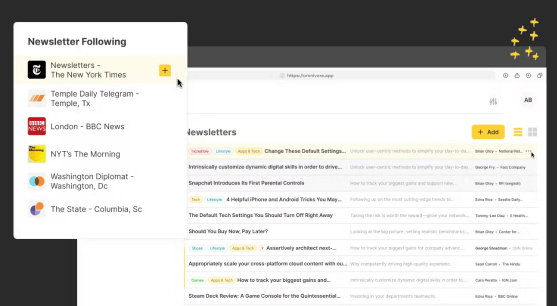
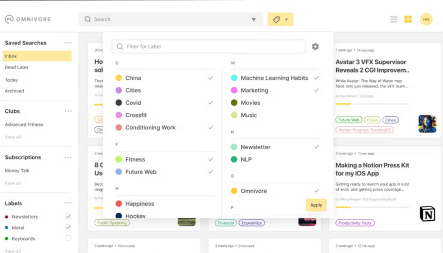
With all this collected information, Omnivore helps organize a “reading list.” Like Readwise, Omnivore supports labels, attributes, and other metadata for sorting articles. It also offers saved searches. However, the user experience is less polished than Readwise’s. Unless you’re well-versed in this classification system, the interface might feel confusing. But Omnivore’s users are likely tech-savvy individuals who prefer self-hosting over buying a ready-made service.
For those who enjoy learning while on the go, Omnivore provides text-to-speech (TTS) capabilities. You can convert saved articles into audio, making it easy to learn during commutes or chores.
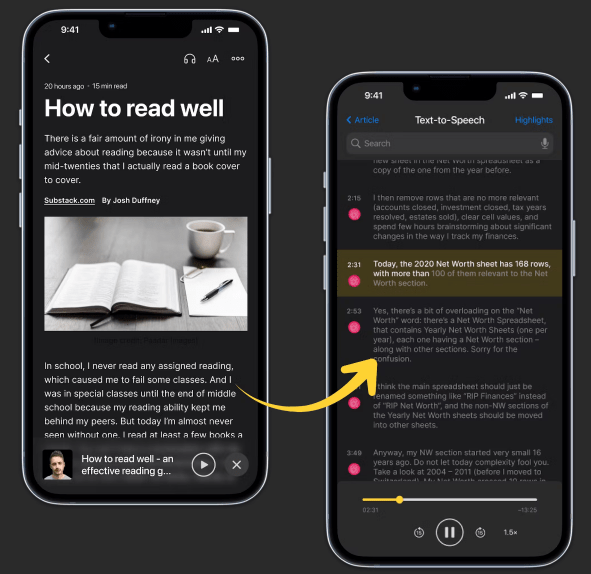
Omnivore also allows highlighting and annotating articles, enabling deeper interaction with texts and the recording of insights. It’s particularly effective when integrated with personal knowledge management(PKM) systems like Obsidian or LogSeq, although some formatting issues may need adjustment.
Omnivore is a free, open-source software offering an online hosted version that requires registration. Although currently free, this loops back to privacy concerns. Fortunately, you can self-host Omnivore if you have your own cloud server. I’m unsure if it can be deployed on a NAS, but if possible, it could offer a private bookmark service. However, “self-hosting” can be complex for general users. If better solutions or products arise, I’d gladly share them.
Conclusion
As an open-source project, Omnivore is not only free to use but also allows users to customize and improve it according to their needs.
However, open-source and free come with challenges, like sustainability. Possible future revenue models could include paid versions with premium features, accepting donations, or offering custom services for enterprises. Personally, I’m still using Readwise due to an ongoing subscription and the difficulty of finding a comprehensive self-hosted replacement.
Ultimately, Omnivore’s open-source nature provides a powerful, flexible, and privacy-respecting reading management tool.
Ideally, I hope such services will store data in user-controlled environments rather than on app providers’ servers, accessible to anyone. This aligns with the “build your own system” philosophy I mentioned earlier.


 My Own Sys
Leave a comment