

When I talked about Apple Notes in a previous post, I mentioned that I was on the hunt for a lightweight note-taking app as a replacement. Someone privately recommended Simplenote to me, insisting it would be just my style.
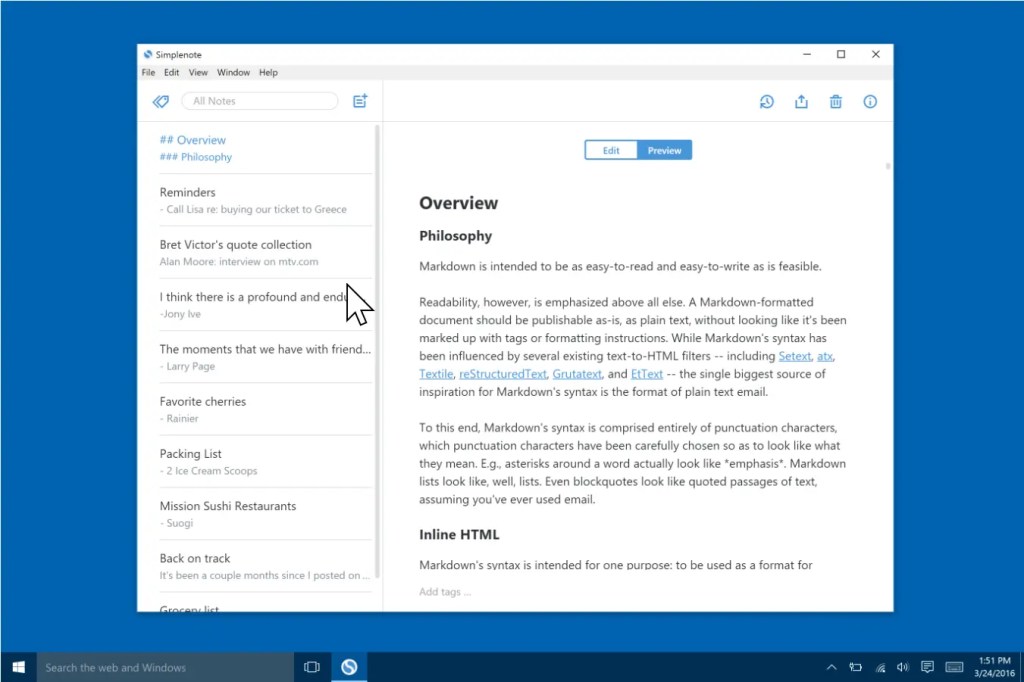
As a blogger who has experimented with various productivity tools over the years, I had some initial impressions of Simplenote: it’s basic. Like, really basic. Its sole focus is on note-taking—none of the fancy features, no AI assistance, no calendar integration, no smart tags. Just notes. A quick side note here: when Notion asked for suggestions on what features Notion AI should include, my response was simple: ditch the AI and let Notion return to its roots. Simplenote, in contrast, is like the poster child for minimalism, a tool that embodies restraint.
Simplenote was originally developed by Simperium back in the 2000s and later acquired by Automattic. Yes, Automattic—the company behind WordPress (which has been making waves recently) and also the one that acquired Day One (another app I love for journaling).
Why Does It Feel Like a “Collection Box”?
Because of my work, I’m constantly reading tons of material and news. I also use multiple devices—Windows, macOS, iOS, Android—and at any given time, I might need to jot down something important. For significant notes or content, I eventually archive everything into my local Obsidian vault. But, in the meantime, cross-platform information gathering and sharing is crucial.
If I use Drafts (which I do) or Apple Notes (which I don’t), they only work perfectly within the Apple ecosystem. At one point, I even used a task manager as my cross-platform “collection box” to store information. Most task managers, like Todoist, work seamlessly across platforms. Another solid option is Google Keep. Although it’s a Google product, it isn’t locked to one ecosystem like Apple Notes, making it usable across nearly all platforms.
Simplenote, though, fits this “collection box” role perfectly. It’s available on iOS, Android, Windows, macOS, and even Linux, and it offers real-time sync. That means I can quickly jot down an idea on my phone, then hop over to my computer to refine it or move it into another app.

What really won me over, though, is that Simplenote is completely free—no hidden paywalls. I remember they used to have a donation option, but now it’s just free, plain and simple. Plus, the app is open-source. You can find the Simplenote repositories for each OS under Automattic’s GitHub page. In theory, we could even tinker with the client ourselves, adding extra features using its text storage API.
This is a huge plus for anyone on a budget or anyone who just wants a simple tool without the frills.
Features of Simplenote
- Completely free: No trial periods, no premium features locked behind paywalls. Everyone gets the full experience (though, to be fair, there aren’t too many features anyway).
- Cross-platform support: Whether you’re using a phone, tablet, or computer, Simplenote’s sync feature allows you to access and edit your notes across all devices.
- Collaboration: Despite its simplicity, Simplenote still allows users to share notes and collaborate with others in real-time.
- Version history: Every time you edit a note, Simplenote saves a version history. If you accidentally delete something important, it’s easy to roll back to a previous version. That said, don’t rely too heavily on this feature—it’s not always foolproof (learned that the hard way).
- Tags: There are no folders here, just tags for simple categorization. For my “collection box” purposes, this is enough. But if you tend to hoard notes, the lack of a more robust organization system might be a dealbreaker.
- Export: You can export all your notes, which is a huge advantage over Apple Notes. This is what an export feature should be—one click and all your notes are packed up in plain text files that you can store locally.

Of course, Simplenote isn’t without its drawbacks. In fact, its minimalist design is a double-edged sword depending on what you’re looking for.
- No support for images or attachments: If you need to exchange images or non-text content across platforms, Simplenote won’t cut it. If you have an image hosting service, however, you can use Markdown syntax to embed images.
- Limited formatting options: Simplenote doesn’t have a WYSIWYG editor and doesn’t support complex text formatting. You won’t be adjusting fonts, colors, or inserting tables like you can in Word or Evernote. The only formatting options here are the bare-bones Markdown it supports (and even then, it’s not rendered in real-time).
- Privacy concerns: There’s been a lot of debate online about whether Simplenote uses end-to-end encryption. In my opinion, privacy is always a concern with cloud-based note-taking apps. I wouldn’t trust Simplenote with sensitive or long-term information. It’s best used as a collection box, not a personal knowledge management (PKM) tool.
A Champion of Minimalism and a Reliable Companion
In today’s crowded productivity app market, Simplenote has carved out a niche for itself thanks to its clean design and free-to-use model.

Think about it: so many tools are bloated with flashy features, hyped-up concepts, and high subscription fees. Yet, most users end up only using a handful of core functions. Simplenote is a refreshing contrast to the trend of over-complicated tools. In a world where the productivity tool market is driven by consumerism, we often find ourselves buying into the latest trendy app—lining the pockets of companies with clever marketing—while forgetting the original goal: to actually boost productivity.
As for me, I’ll keep using Simplenote to capture fleeting ideas and gather cross-platform information. Sometimes, after all, “simple” really is the best choice.
If I have any new insights (or stumble into any issues), I’ll be sure to share them with you all.



 My Own Sys
Leave a comment