

As we wrap up another year, one of my biggest takeaways from 2024 has been a redefined understanding of what it means to have “your own system.” Over the past year, I’ve drastically reduced my reliance on cloud-based tools in favor of solutions that prioritize local-first or even self-hosted setups.
The goal? Taking control of my own data and workflows. And looking ahead to 2025, I’m confident I’ll continue down this path. Because, to me, great productivity tools should support users—not control them.
Among the tools that meet my self-ownership criteria, I’ve been consolidating wherever possible. And at the core of my productivity stack are two local-first note-taking tools: Obsidian and LogSeq.
Both tools are Markdown-based, both support local storage (though they also offer remote sync options), and I’ve often wondered: Can one truly replace the other? Could I use just Obsidian and ditch LogSeq, or vice versa?
TL;DR: No, They Can’t Replace Each Other (For Me)
After countless attempts to unify my workflows, I’ve come to the conclusion that Obsidian and LogSeq can’t fully substitute for each other, at least not for my specific needs. Unless I’m willing to use additional plugins or even external tools, each app continues to fill a distinct role.
Here’s why.
Why LogSeq Can’t Replace Obsidian
LogSeq is one of the early pioneers of bi-directional linking, a hallmark of modern note-taking, debuting around the same time as Obsidian.

However, Obsidian has evolved far beyond just a note-taking tool. At this point, it’s more of an operating system for connected thinking, thanks to its robust ecosystem of plugins and extensions.
From tools like Day Planner, Kanban, and Dataview Query, to the endless stream of innovative plugins, Obsidian’s versatility is unmatched. This rapid expansion shows no signs of slowing down, with new features continuously rolling out. For instance, the latest Insider build introduces a split-view browser, something I’m genuinely excited about.
In contrast, LogSeq’s development has stagnated. Updates have been sparse, and its plugin ecosystem pales in comparison to Obsidian’s—both in terms of quantity and quality. Obsidian’s plugin library is in a league of its own, while LogSeq’s offerings feel relatively limited and immature.
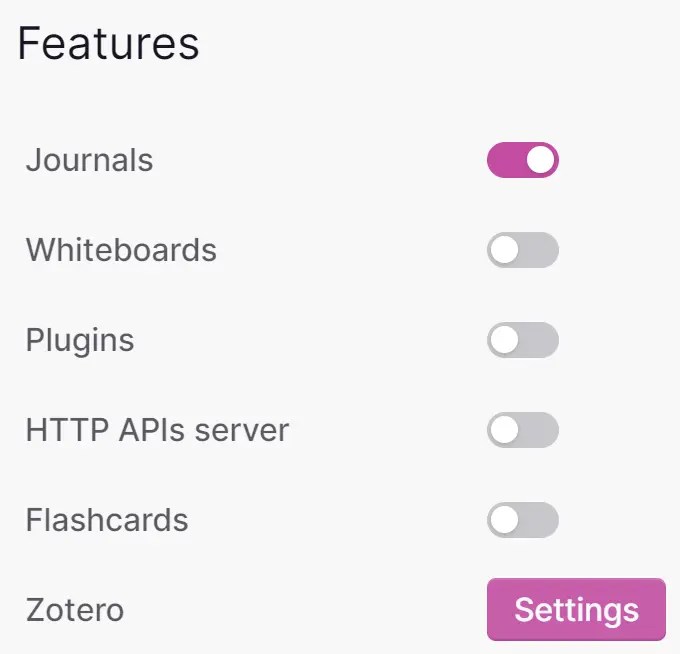
What worries me most, though, is the lack of visible progress from LogSeq’s team. While I admire LogSeq’s core strengths, I can’t help but wonder if they’re quietly working on a major overhaul—like the rumored database-powered version. Such a massive update could consume significant resources and, in the worst case, lead to features I’d immediately turn off. (I’ve already disabled things like LogSeq’s whiteboards and kept only its core functionality.)
The Problem With Playing Catch-Up
One of LogSeq’s biggest challenges is that it often feels like a follower rather than an innovator. It seems determined to replicate everything Obsidian does, but it struggles to keep pace. And even if it were to succeed, what’s the point of being a second-rate Obsidian?
This isn’t to say LogSeq doesn’t have potential. I hope it can break free from this cycle and carve out its own identity. But for now, it’s stuck in a reactive mode, trying to play catch-up with Obsidian’s upward trajectory. And that’s disheartening because I believe great tools shouldn’t aspire to be like others—they should strive to be the best version of themselves.
For 2024, one of my biggest uncertainties is whether LogSeq’s rumored “big update” will be a game-changer—or just another distraction. Time will tell.
Why Obsidian Can’t Replace LogSeq
Given Obsidian’s impressive versatility, you might wonder why I can’t just use it to replace LogSeq entirely. After all, Obsidian seems to do everything better, right?
Not exactly. For my use case, LogSeq still offers something Obsidian simply can’t replicate: the “node-based journaling” and “super tags” system. These are LogSeq’s secret sauce—the heart and soul of the app. Every other feature in LogSeq feels secondary, but this core functionality is irreplaceable for me.

If you’re unfamiliar with what I mean by node-based journaling, think of Tana—a cloud-based app that mirrors LogSeq’s best features. In fact, I suspect Tana drew significant inspiration from LogSeq, reimagining its essence for a connected, cloud-first world. But for those of us who prefer local-first tools, LogSeq’s unique approach remains unparalleled.
Without this node-based system, LogSeq is just another bi-directional linking note-taking tool, and in that scenario, Obsidian (with its plugins) would easily take the lead. But this one feature keeps LogSeq firmly in my workflow.
The Plugin Dilemma
Another reason Obsidian can’t completely replace LogSeq is my aversion to over-relying on plugins. While Obsidian’s plugin ecosystem is fantastic, it comes with its own risks. Many plugins are third-party projects, and over time, some become outdated, incompatible, or abandoned altogether. I recently fell into this trap with the Query Control plugin—my only must-have Obsidian plugin—which stopped working after a recent app update.
LogSeq, on the other hand, provides native features that eliminate the need for most plugins. Its built-in query capabilities surpass anything I’ve seen in Obsidian’s core functionality or third-party plugins. Ironically, while Obsidian markets itself as a “self-controlled system,” its plugin ecosystem can sometimes create dependencies that undermine that promise.
Looking Ahead: Tana and the Future of Productivity Tools
It’s worth mentioning Tana again because its potential excites me. If Tana ever released a local-first version, it could become a serious contender for replacing both Obsidian and LogSeq. While node-based systems are still a niche concept, who’s to say they won’t follow the same trajectory as early Apple computers—going from geeky tools to mainstream staples?

For now, though, Obsidian remains my most stable and reliable tool. I’d even recommend it as a central hub for anyone’s note-taking and personal knowledge management system (PKM). Whether you’re simply archiving notes, building a PKM, or exploring advanced workflows like AI-powered insights, Obsidian offers unmatched flexibility while keeping your data firmly under your control.
As for LogSeq, I’ll continue using it for as long as it remains functional. And if the worst happens—if development halts entirely—I could always build a workaround to bring node-based journaling into Obsidian. In fact, I’m tempted to experiment with that idea now. If I ever release something, I hope you’ll check it out!
Final Thoughts
At the end of the day, Obsidian and LogSeq each have their strengths and weaknesses. While neither can fully replace the other for me, they complement each other in ways that enhance my productivity. As we head into 2025, I’ll be watching closely to see how these tools evolve—and whether Tana or another contender emerges to shake things up.
For now, I’m content to keep both tools in my arsenal. After all, when it comes to productivity, sometimes the best system is one that embraces a bit of flexibility.



 My Own Sys
Leave a comment