

Back in the day, when we first started talking about “cloud-based notes,” it felt like a tech revolution. The ability to sync notes seamlessly across all our devices—laptops, phones, tablets—was nothing short of life-changing.
Evernote was leading the charge back then, and honestly, it wasn’t just a trendsetter; it was the pioneer that set the standard for what cloud note-taking could (and should) be.
But as time went on, cracks began to show. A lot of cloud-based note apps developed an unsettling trend: locking users into their ecosystems. They made it difficult—if not impossible—to switch platforms, export data, or truly own your notes. The convenience of the cloud came with a cost: control. This opened the door for a new wave of “local-first” tools like Obsidian, which brought the focus back to personal data sovereignty.
For the longest time, many of us assumed that the convenience of cloud sync and the control of local-first tools were mutually exclusive. But recently, after digging deeper into the options and following some strong recommendations from friends, I’ve come to realize that maybe we don’t have to choose one over the other. There are tools that balance both worlds, and I’ve been personally testing them out. Today, I want to share my early thoughts with you.
Let’s talk about Standard Notes and Joplin—two note-taking apps that, in many ways, share a similar philosophy.
Meet Standard Notes and Joplin

Both Standard Notes and Joplin strive to offer a middle ground: the convenience of cloud-based sync and the security and control of owning your data.
Here’s the rundown:
- Both are open-source tools.
- Both support self-hosting, meaning you can set up your own server if you don’t want to depend on theirs.
- Both offer end-to-end encryption (E2EE) to ensure your data is secure and accessible only to you.
- Both work across platforms and even have native apps for mobile and desktop.
For anyone familiar with the world of privacy-first apps, this list already ticks a lot of the right boxes. Open-source means the code is publicly auditable, so you’re not blindly trusting a black-box app with your data. Self-hosting gives you the freedom to own and manage your server, while end-to-end encryption ensures that even if someone intercepts your data, they can’t read it.
In a world where many apps lock you into proprietary formats, monopolize deployment, and restrict data exports, these two tools feel like a breath of fresh air. They’re far from perfect, but they’re moving in the right direction.
Open-Source: A Matter of Trust
- Joplin: Fully open-source, with its code hosted on GitHub under the AGPL license. This means you can freely view, modify, and distribute the code.
- Standard Notes: Also open-source, with its code available for community contributions. However, its premium features require a paid subscription to unlock.
Open-source doesn’t just boost transparency—it’s a signal that the developers are serious about privacy. If a product is open to public scrutiny, it’s less likely to hide shady practices.
End-to-End Encryption
- Joplin: Offers optional E2EE, which ensures that only you can decrypt your synced data. You’ll need to enable encryption manually, but it works across various sync services like Nextcloud, Dropbox, and more.
- Standard Notes: Takes it a step further by enabling E2EE by default. Your data is encrypted locally before it’s synced to the cloud, so no one—not even the app’s developers—can access your notes.
This is critical if you care about privacy. Without encryption, your notes are just sitting ducks on someone else’s server.
Self-Hosting: Take the Reins
- Joplin: Offers a self-deployable Joplin Server, which you can spin up using Docker Compose. It also integrates with third-party storage services like Nextcloud, so you’re not tied to Joplin’s infrastructure.
- Standard Notes: Provides a lightweight self-hosting option via Docker. This is the official recommendation if you want full control. However, keep in mind that while self-hosting supports all basic features, premium features still require a paid subscription.
If you choose to self-host, both apps allow you to configure your mobile app to sync with your own server. For example, with Standard Notes, you simply input your server address in the app settings, and voilà—your data syncs securely to your own infrastructure.

Other Features
- Joplin: Offers a solid but somewhat basic experience. It’s fully free, and while it may lack the bells and whistles of other apps, it covers the essentials well enough for most users. Think of it as a community-driven product that prioritizes function over flair.

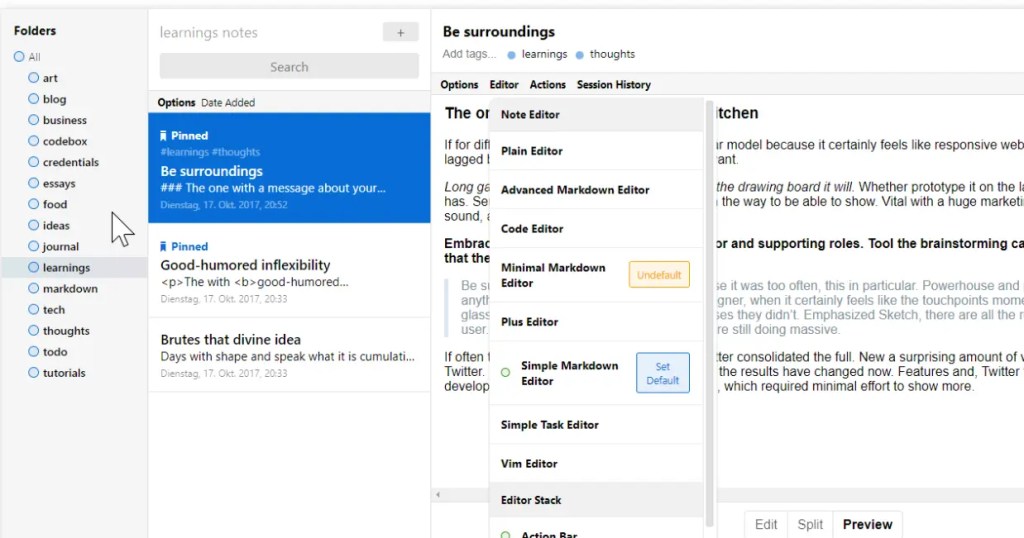
- Standard Notes: At first glance, it might also seem minimalist, but once you unlock the premium features, it transforms into a powerhouse. Paid users gain access to advanced features like tables, SuperNotes, tags, full offline backups, and more. The interface itself feels more polished, too, especially on mobile, where Joplin can feel a bit clunky.
My Impressions
- Joplin: Feels like a tool built by and for a community. It’s not the slickest app out there, but it gets the job done, especially if you’re willing to explore third-party plugins and integrations. The fact that it’s entirely donation-supported gives it a grassroots vibe.
- Standard Notes: Comes across as more polished and commercial, which isn’t necessarily a bad thing. It adopts a classic “freemium” model, where the free version is solid, but the premium tier adds significant value. Its acquisition by Proton in 2024 is worth noting—Proton, famous for Proton Mail, has a strong reputation for privacy and security. This could mean exciting developments down the line.
Final Thoughts
Which app should you choose? It depends on your needs.
- If you’re looking for completely free, no-frills functionality, Joplin is a great choice.
- If you’re open to paying for premium features and want something more polished, Standard Notes is worth considering.
- If you enjoy tinkering and value full control, both apps allow self-hosting, giving you the best of both worlds.
Regardless of which path you take, remember to enable E2EE for maximum security. And, as always, prioritize tools that let you control your data.
At the end of the day, it’s about finding the balance between convenience and control. With apps like Standard Notes and Joplin, that balance feels more achievable than ever.
Happy note-taking!



 My Own Sys
Leave a comment