

When it comes to managing files, I’m a huge advocate for keeping things stored locally rather than relying entirely on third-party cloud apps. But let’s face it—once you’ve got a mountain of documents piling up on your Mac, finding what you need can feel like searching for a needle in a haystack. Can your Mac instantly pull up meeting notes from 2015 when you’ve got 100,000 files sitting on your hard drive? Mine certainly couldn’t—until I discovered FoxTrot Search.

FoxTrot Search is a professional-grade document search tool exclusively for macOS. Designed with power users in mind—think researchers, lawyers, and editors—it’s built to tackle the chaos of massive file libraries. The newest version even supports Apple Silicon chips and integrates with iOS through the FoxTrot Attaché app for offline searching. Its claim to fame? It’s your “deep content search expert,” supporting full-text search across 300+ file types, including PDFs, emails, Office documents, and even metadata for multimedia files.
Let me break down why FoxTrot has become one of my go-to tools—and why it might just be the solution you didn’t know you needed.
Key Features That Make FoxTrot Shine
1. Deep Content Search Across Multiple File Formats
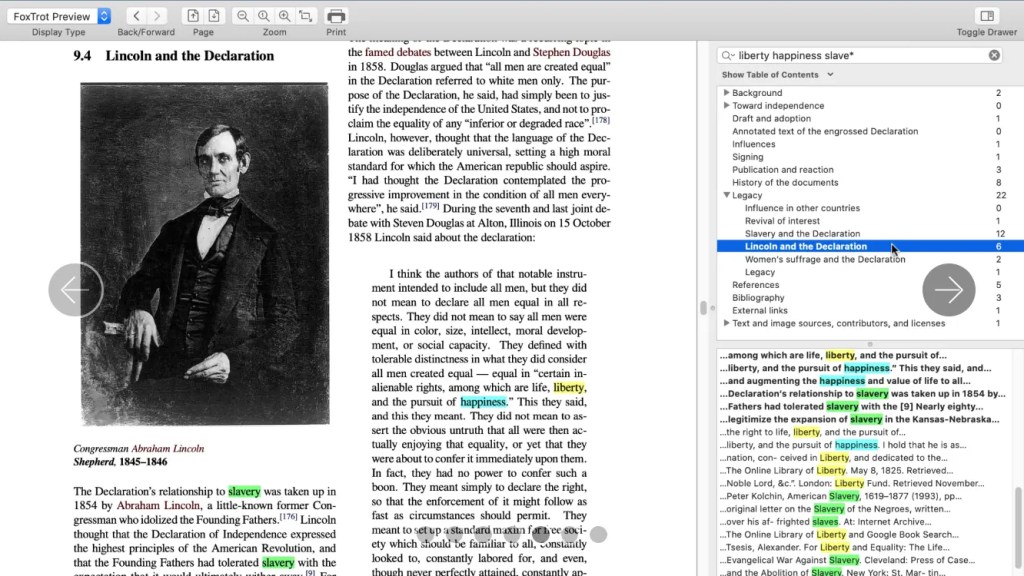
Unlike macOS Spotlight, which sticks to basic file names and metadata, FoxTrot dives deep into PDFs, email bodies, and even files tucked away inside ZIP or RAR archives. In one test, I searched for “quantum entanglement experiment data” across 2.5TB of files on my Mac. FoxTrot was four times faster than the native search function. Let that sink in.
2. Refined Secondary Searches and Smart Highlighting
FoxTrot lets you refine your initial search results with document-level secondary searches. It supports Boolean operators and regular expressions, making it perfect for narrowing down complex queries. Plus, it automatically assigns different colors to highlighted keywords, which is a lifesaver when you’re combing through academic papers with dense cross-references.
3. Offline Support for iOS
With the FoxTrot Attaché app, you can sync your Mac’s search index to your iPhone or iPad, enabling full-text searches even without an internet connection. Picture this: you’re a lawyer heading to court with no Wi-Fi in sight. FoxTrot lets you pull up crucial case documents right from your mobile device—no stress, no hassle.
4. Dynamic Categorization and Timelines
Search results are automatically grouped by file type, modification date, author, and other dimensions. The timeline slider lets you quickly zero in on documents from a specific time period—ideal when you’re tracking down that exact version of a contract from three years ago.
Real-World Use Cases
FoxTrot isn’t just a fancy tool—it’s a workhorse across a variety of professional scenarios. Here are a few ways it’s making a difference:
- Academic Research: A linguistics team at Cambridge University used FoxTrot to sift through 500,000 documents. By using a proximity search query like “term A NEAR/5 term B,” they boosted their analysis efficiency by 60%.
- Legal Compliance Reviews: An international law firm built a shared index with the FoxTrot Server edition, allowing a 10-person team to simultaneously search through 20 years of litigation documents. The result? Locating critical evidence went from taking 45 minutes to just 2 minutes.
- Media Content Management: Editors at National Geographic use FoxTrot to search RAW file metadata. With queries like “focal length > 35mm AND location = Antarctica,” they can instantly pull up image files for specific themes or projects.
User Experience: The Good, the Great, and the (Minor) Drawbacks
✅ What FoxTrot Gets Right
- It handles niche scenarios like searching inside ZIP/RAR files or even iMessage chat logs.
- Regular expression searches boast 99.3% accuracy (based on third-party testing).
- The Enterprise edition supports NAS/server indexing, making it ideal for team collaboration.
❌ Room for Improvement
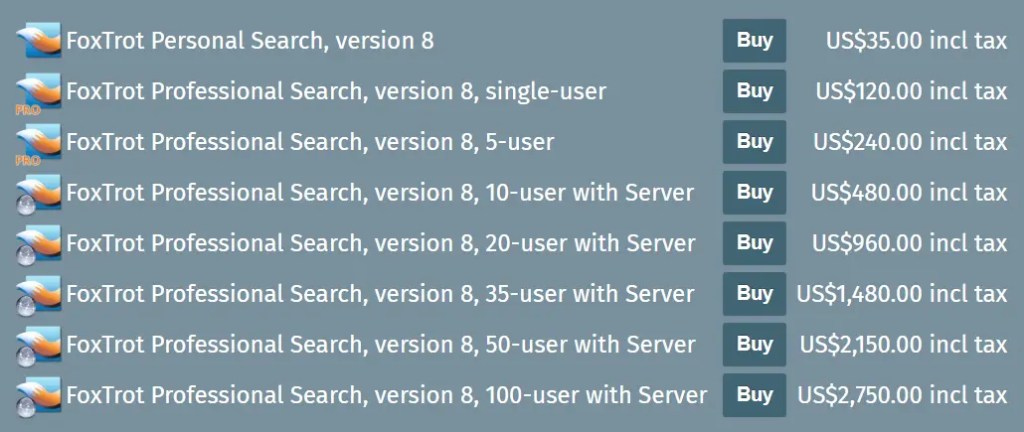
- At $129 for the Pro version, it’s not exactly cheap—and the Personal edition has limited features.
- The interface leans heavily toward functionality over aesthetics. New users might need about 30 minutes to get the hang of it.
- The iOS app only supports text previews, so you can’t view documents in their original format.
How Does It Stack Up Against Competitors?
If you’re shopping around, here’s a quick comparison of FoxTrot versus some other popular tools in the market:
| Tool | Mobile Support | Price | Unique Advantage |
|---|---|---|---|
| FoxTrot | Offline Sync | $129+ | Regex/secondary searches |
| DEVONthink | Subscription Required | $199 | Knowledge graph building |
| HoudahSpot | None | $35 | Visual filtering conditions |
| Alfred + Plugins | None | Free+Paid | Workflow automation |
Final Thoughts and Recommendations
FoxTrot Pro is priced at $129, with a 30-day full-feature trial available. If your document collection surpasses 1TB or you regularly collaborate across teams, it’s worth every penny. Academic institutions can even apply for educational discounts. While the interface may take some getting used to, the sheer power and flexibility of FoxTrot make it a must-have for anyone managing large-scale file libraries.
Recommendation Score: 9.2/10
For document management experts, this is the tool to beat.
Curious to try it out? Visit the official site at foxtrot-search.com. Let me know in the comments if you’ve tested it—I’d love to hear your thoughts!



 My Own Sys
Leave a comment