

As someone who’s deeply interested in open-source and self-hosted solutions, I couldn’t help but take notice of BookStack when I first came across it. My immediate reaction? For small businesses or startups, BookStack might just be the ideal alternative to SharePoint.
When it comes to selecting an internal portal or document management tool for a company, both BookStack and SharePoint offer compelling options. Each has its own unique features and strengths, but how do they actually perform in a real-world business setting—especially for tasks such as sharing employee handbooks, operational guides, or departmental knowledge?
Here’s my detailed comparison of the two platforms, breaking down their core functionalities, use cases, and pros and cons.
Core Feature Comparison
| Feature | BookStack | SharePoint |
|---|---|---|
| User Experience | Simple and intuitive, built around a “Bookshelf > Books > Chapters > Pages” structure. Easy to learn. | Flexible but complex. Highly customizable but comes with a steep learning curve, ideal for those familiar with Microsoft tools. |
| Document Management | Offers essentials like version control, page linking, and cross-book organization. Great for small teams. | Powerful document management, including metadata search, versioning, permissions, and seamless integration with Office 365. |
| Portal Functionality | Primarily a knowledge base or document storage. Doesn’t support full enterprise portal features. | Supports dynamic enterprise portals, team sites, news publishing, and content management for large-scale needs. |
| Permissions Control | Simple role-based access controls. Easy to set up restrictions. | Advanced and granular permissions, supporting multi-layered access and Single Sign-On (SSO). |
| Collaboration | No real-time editing. Suitable for solo or time-shifted collaboration. | Real-time collaborative editing, integrated with Microsoft Teams and OneDrive for enhanced productivity. |
| Search & Discovery | Simple global search. No advanced or cross-system search capabilities. | Robust full-text search across SharePoint and Microsoft 365. Includes PDF and metadata indexing. |
| Cost | Free and open source. Only requires hosting/server costs. | Subscription-based pricing (typically bundled with Microsoft 365), potentially expensive for smaller businesses. |
When to Choose BookStack
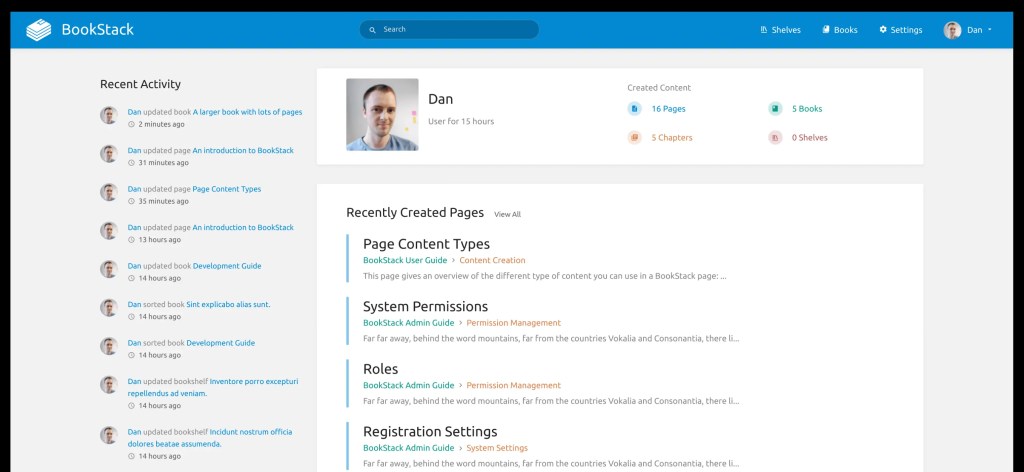
1. Small Teams or Startups
If your company is small and primarily needs a centralized location to store static documents like employee handbooks or operational guidelines, BookStack is a lightweight and cost-effective choice.
Its straightforward design means no steep learning curve, and it doesn’t require a dedicated admin to manage. For teams with limited budgets, this is a major win.
2. Knowledge Base Management
BookStack’s hierarchical structure—“Bookshelf > Books > Chapters > Pages”—makes it ideal for organizing technical documentation or internal training materials. It’s clean, intuitive, and gets the job done without unnecessary bloat.
3. Data Privacy is a Priority
Since BookStack operates on a self-hosted model, all data remains on your local server, eliminating any reliance on third-party cloud services. This is perfect for teams with strict data privacy requirements or those operating in regulated industries.
When to Choose SharePoint
1. Large Enterprises or Cross-Department Collaboration
With its ability to create dynamic enterprise portals, SharePoint is the go-to choice for large organizations. It can handle everything from publishing company news to integrating information across multiple departments.
Its advanced permissions management also ensures that access can be carefully tailored to specific teams, roles, or individuals.
2. Real-Time Collaboration & Productivity
SharePoint’s deep integration with Microsoft Teams and OneDrive isn’t just a nice-to-have—it’s a game changer. Employees can co-edit documents in real-time, assign tasks, and communicate seamlessly, all within the same ecosystem.
3. Diverse Content Management Needs
Beyond document sharing, SharePoint lets you create interactive content such as surveys, video training modules, and even dynamic reports through Power BI integration. Its versatility is unmatched.
4. Mobile-First and Remote Work
With its mobile-optimized design and cloud-first approach, SharePoint is perfect for modern enterprises with remote teams or employees on the go.
Pros & Cons
BookStack
Pros:
- Free and open source, with minimal deployment costs.
- Clean, user-friendly interface that’s easy to pick up.
- Excellent data privacy thanks to self-hosting.
Cons:
- Limited features; no real-time collaboration.
- Not suitable for comprehensive enterprise portal needs.
- Basic search functionality that may fall short for complex queries.
SharePoint
Pros:
- Comprehensive functionality, ideal for building complex internal portals.
- Seamless integration with Microsoft 365, boosting collaboration and productivity.
- Highly customizable to meet specific business needs.
Cons:
- Steep learning curve; requires dedicated admin support.
- High cost, making it less viable for small teams or tight budgets.
- Heavy reliance on the Microsoft ecosystem, which may not work for non-Microsoft users.
Final Thoughts and Recommendations
Ultimately, the choice between BookStack and SharePoint depends on your organization’s size, budget, and specific needs:
- Small Teams or Budget-Conscious Organizations: If your primary goal is to store and share static documents (like employee handbooks or guides) without breaking the bank, BookStack is a fantastic option. Its simplicity, cost-effectiveness, and privacy-focused nature make it a favorite for startups and small teams.
- Large Enterprises or Feature-Rich Needs: For those needing a dynamic enterprise portal with real-time collaboration, advanced permissions, and seamless Microsoft integration, SharePoint is the obvious choice. It’s built for large-scale, complex environments, where functionality and flexibility take precedence over cost.
At the end of the day, your decision should align with your team’s size, workflow, and long-term goals. Do you need something lightweight and easy to manage? Or are you looking for an all-in-one powerhouse for collaboration and content management? Whatever the case, both tools have their place—and it’s up to you to decide which one fits your bookshelf.



 My Own Sys
Leave a comment