

AWS: 10 Years of Data Gone
Recently, I came across a blog post by Ruby ecosystem contributor Seuros titled “AWS Deleted My 10-Year Account and All Data Without Warning.” In it, Seuros shares the harrowing story of how a decade’s worth of data stored on AWS vanished due to what appears to be an internal operational mishap.
You can read the original post here.
For years, big-name cloud providers like AWS have been seen as the gold standard for data storage—offering robust backup systems, strict operational protocols, and assurances against data loss. And for enterprise users, service-level agreements (SLAs) often promise a level of reliability and accountability.
But Seuros wasn’t an enterprise user. He was an individual customer. And despite following AWS’s own best practices for redundancy and disaster recovery—multi-region replication, segregated encryption keys, and more—his account was flagged during an internal verification process, marked as “problematic,” and swiftly terminated. His data? Completely gone, with no recovery options.
What’s worse is the 20 days of back-and-forth with AWS support, which failed to provide clear answers or solutions. In the end, this wasn’t just a technical failure; it was a failure in transparency, accountability, and support.
OneDrive: 30 Years of Photos Lost
Similarly, a Reddit user by the name of deus03690 recently shared a nightmare scenario involving OneDrive. After migrating 30 years of personal photos and work files to OneDrive, Microsoft locked his account without explanation.
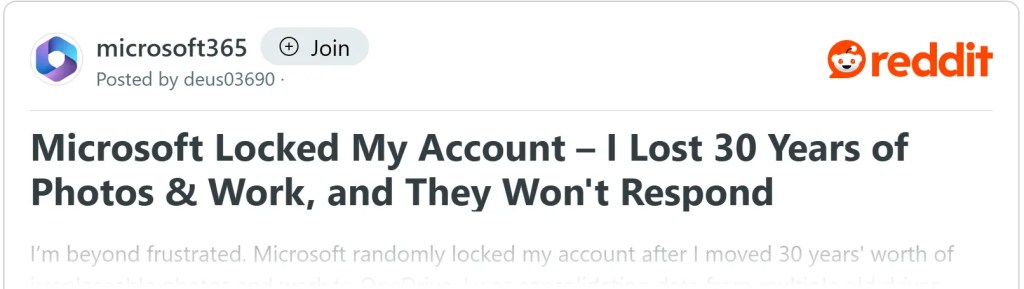
Despite numerous appeals, all he received were canned template responses. His data? Irretrievable. Like AWS, Microsoft’s support system for individual users proved to be a wall of silence, leaving him powerless to recover decades of irreplaceable memories and work.
The harsh reality for both cases? These were individual users without the safety net of high-level SLAs. And while enterprise customers may have some recourse, personal users often find themselves at the mercy of vague terms of service and liability disclaimers buried in the fine print.
Cloud Storage: A Double-Edged Sword
Cloud storage has revolutionized how we store and access data. With efficient backups, cross-region disaster recovery, and seamless accessibility, it’s easy to see why so many of us trust cloud providers like AWS or Microsoft. These were precisely the reasons Seuros relied on AWS for his open-source development projects, even going above and beyond to implement additional safeguards.
Yet, despite technical reliability, operational risks remain an Achilles’ heel. In Seuros’s case, it wasn’t a hardware failure or a natural disaster that wiped his data—it was an internal error. As he describes in his blog, AWS’s verification process flagged his account incorrectly, and his data was deleted. The irony? His meticulously designed architecture couldn’t account for AWS itself being the single point of failure.
Reading his blog feels like watching the Titanic sink—not because of an iceberg, but because someone forgot to tighten a single screw.
What This Means for Data Management
Incidents like these underscore the risks of relying too heavily on cloud storage, especially for personal or irreplaceable data. While cloud services offer convenience, they also come with inherent vulnerabilities, particularly when the provider’s internal processes go awry.
Here are some lessons and strategies for safeguarding your data:
- Diversify Your Backups
- Never put all your trust in a single provider. Whether it’s AWS, OneDrive, or another service, relying on one platform is no safer than storing everything on a single hard drive. Use a combination of local storage, external drives, and multiple cloud providers to distribute risk.
- Avoid Vendor Lock-In
- Be wary of apps or platforms that lock your data into their ecosystem without easy export options. If there’s no way to retrieve your data in an open, portable format, think twice before entrusting them with anything critical.
- Make Local Backups a Priority
- Cloud storage should complement, not replace, local backups. For important data, maintain offline copies on external drives or NAS systems. This ensures you remain in control, even if your cloud account gets locked or deleted.
- Choose Local-First Tools
- Opt for tools and software that prioritize local storage, such as Obsidian, LogSeq, or Markdown-based editors. These tools give you full control over your data and make offline backups straightforward.
- Always Prepare for the Worst
- Assume that any cloud account could be suspended or deleted tomorrow. Have an exit strategy in place. Regularly export data from cloud apps and archive it locally to avoid unpleasant surprises.
A Final Word: Be the Master of Your Data
As technology advances, offering us unprecedented convenience through cloud services and AI tools, it’s crucial to remember one thing: never entrust your most valuable information entirely to a single provider.
Seuros’s ordeal with AWS is a wake-up call for all of us. If we don’t take ownership of our data, the providers will. And they’ll exercise that ownership according to their own priorities—not ours.
To ensure you remain in control, build your own systems. Be proactive, be prepared, and never assume that “it won’t happen to me.” Because as these stories show, when it comes to the cloud, the unthinkable can—and does—happen.




 My Own Sys
Leave a comment