

Have you ever felt that your digital life is fragmented? Your work code is in a Git repository, personal projects on an SFTP server, photos scattered across Google Drive or Dropbox, and some datasets archived in an S3 bucket. We constantly switch between tabs, apps, and interfaces, a process that is not only inefficient but also creates a nagging feeling of disorganization.
What if there was a way to elegantly manage all this data from a single place, without having to migrate everything into one giant, proprietary basket?
The creator of Filestash clearly pondered this very question. Instead of building yet another Dropbox clone, they pursued a more ambitious goal: to build the best web-based file manager ever made. The philosophy to achieve this isn’t to create a walled storage garden, but to become an open, universal “data frontend.” Filestash empowers you to manage your data right where it lives, whether that’s on an FTP server, in a WebDAV share, an S3 bucket, or even a Git repository.
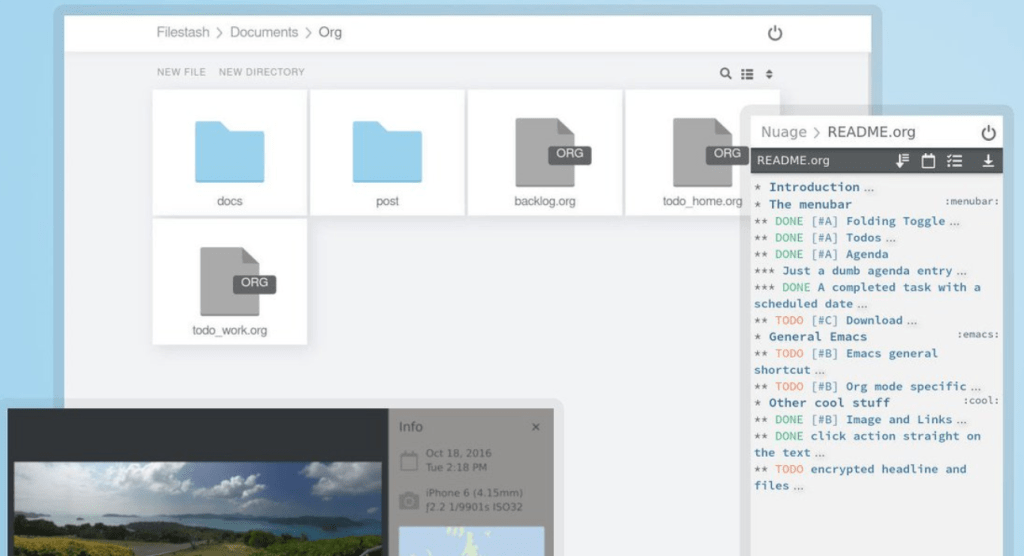
The Superpower: Connecting Everything
Filestash’s most impressive feature is its vast connectivity. It acts like a master key, capable of unlocking and interfacing with nearly every storage protocol and service you can think of.
While it handles standard file uploads, downloads, and sharing with ease, that’s not the main story. Its core magic lies in consolidating these diverse data sources into a single, unified interface:
- Traditional Servers: FTP, FTPS, SFTP, WebDAV, SMB, NFS.
- Object Storage: S3 (and any S3-compatible service like Minio or Backblaze B2).
- Cloud Drives: Dropbox, Google Drive.
- Developer Tools: Browse Git repositories directly.
- Databases & Directories: Even browse Mysql databases or LDAP/CalDAV/CardDAV directories as if they were file systems.
This means no more firing up a terminal or a separate client for server access, and no more opening another browser tab for your cloud documents. Everything converges here.
Where Does Filestash Fit In? A Quick Comparison
At this point, you might be thinking, “This sounds interesting, but how does it differ from tools like Nextcloud?” That’s a crucial question, as their core philosophies are fundamentally different.
- vs. Nextcloud: Think of Filestash as a universal remote control for all your existing media players (your data sources). In contrast, Nextcloud aims to be an all-in-one home theater system. Nextcloud provides a complete, integrated platform with files, calendars, contacts, and an extensive app ecosystem, encouraging you to bring your data into its environment. Filestash assumes your data is already where you want it to be and simply provides a powerful, unified interface to access it.
- vs. FileBrowser: FileBrowser is a fantastic, lightweight tool that does one thing exceptionally well: it gives you a simple web interface for a specific directory on your server. It’s the perfect tool for quick, no-fuss local file management. Filestash operates on a grander scale; its starting point is connecting to that server and all your other data sources scattered across the internet.
- vs. Tools like Cloudreve: Some tools are designed to help you build your own personal Dropbox-like service. They use object storage (like S3) as a backend to store the files you upload to them. Filestash sees this differently. To Filestash, that S3 bucket isn’t a backend; it’s a peer—another data source you can connect to and manage directly, alongside your SFTP server and Google Drive.
Filestash carves out a unique niche. It doesn’t want to be your storage; it wants to be the best way to manage your storage, wherever it may be.

The Roadmap: Letting Your Browser Open Anything
Filestash’s ambition doesn’t stop at just connecting. A major ongoing effort is to make Filestash capable of opening virtually any file type.
Thanks to its plugin system, Filestash is continuously adding preview support for specialized file formats the browser has never heard of, including:
- Photography: RAW formats like HEIF, NEF, CR2, DNG.
- Data Science: FITS (astronomy), Parquet, Arrow, and HDF5.
- Creative Design: Previews for PSD, AI, Sketch, DWG, and DXF.
- And many more: From biomedical formats (DICOM) to 3D models and even embroidery patterns.
This goal of becoming a “universal viewer” perfectly illustrates its mission to be the most powerful web file manager.
Who Is It For? And What’s the “Cost”?
Filestash is ideal for:
- Developers & Tech Enthusiasts: If you live between servers, Git, and S3, it will dramatically streamline your workflow.
- Digital Nomads: If your files are spread across multiple services and devices, it provides a much-needed unified view.
- The Privacy-Conscious: By self-hosting, you control the application. Filestash is just a gateway; it doesn’t store your files, giving you full data sovereignty.
- Small Teams: It can serve as a unified portal for internal file access, integrating with existing authentication systems like LDAP.
The “Cost” of Admission:
Filestash is open-source (AGPL-3.0 license) and free to use. However, this freedom comes with the cost of technical responsibility. It needs to be “self-hosted,” meaning you need a server to run it on (a device with as little as 128MB of RAM can work). The easiest way to get started is with Docker.
For individuals, community support is available via IRC. For commercial use, paid support contracts are offered.

Final Thoughts: Regrets and High Hopes
After over eight years of active development, Filestash is already rock-solid. If there’s a minor regret, it might be the lack of an official mobile app for now, though the web interface works well on mobile browsers.
But what’s most exciting is the project’s stated goal for its v1.0 release: to be objectively better than Dropbox, Google Drive, and Box on every single measurable metric they care about.
This isn’t just the ambition of creating another alternative; it’s the pursuit of excellence. It’s this spirit that makes Filestash a treasure worth watching and, more importantly, worth trying. It suggests that we don’t have to choose between convenience and control—we might just be able to have both.


 My Own Sys
Leave a comment