

As a blogger who cares deeply about self‑hosting and local‑first tools, I’ve spent years chasing the “ultimate” note‑taking setup. We’ve all tried feature‑bloated, all‑in‑one cloud apps that quietly lock our data behind their walled gardens. Every time a shiny new service launches, a voice in my head asks: in five years, will I still be able to read and move my notes—easily?
That anxiety around ownership and longevity is exactly where nb shines. No flashy UI. No complicated cloud sync. Its GitHub page says it plainly: a single, portable script. The philosophy behind that is powerful—go back to basics, build on plain text, and make a knowledge base that truly belongs to you.
More Than Notes: A CLI‑Powered Swiss Army Knife for Knowledge
At first glance, nb looks like a simple command‑line note tool. Spend a little time with it, though, and you’ll find a thoughtfully designed personal knowledge system with surprising depth.
The Foundation: Plain Text + Git
This is what hooked me. Your notes, bookmarks, and todos live as plain text—Markdown, Org, and more—on your machine. That means:
- Evergreen by design: If a device can read text, your notes will outlast trends and formats.
- Editor freedom: Use Vim, Emacs, VS Code, Sublime Text—whatever you love. nb handles the plumbing; you focus on writing.
- Versioning and sync, built in: nb quietly uses Git in the background. Every add, edit, or delete becomes a commit. You get a full revision history, easy rollbacks, and hassle‑free syncing via any remote (e.g., a private GitHub/GitLab repo). It’s free, portable, and vendor‑independent.
Standout Capabilities: Plain Text, Supercharged
If nb just dropped files into Git, I wouldn’t be this excited. Its real strength is the cohesive workflow it builds around plain text.
- Powerful bookmarking, not just “saving links.”
Run nb https://example.com and it doesn’t merely stash a URL. It fetches the page, cleans the markup for readability, converts content to Markdown (with Pandoc when available), and saves it locally as a human‑friendly note. That gives you:- Full‑text search across your archived page contentDistraction‑free local reading in terminal or GUI browsers via nb browseResilience when pages die, with Wayback Machine snapshot lookup for broken links
In short, it’s like your own personal, searchable web archive.
- Full‑text search across your archived page contentDistraction‑free local reading in terminal or GUI browsers via nb browseResilience when pages die, with Wayback Machine snapshot lookup for broken links
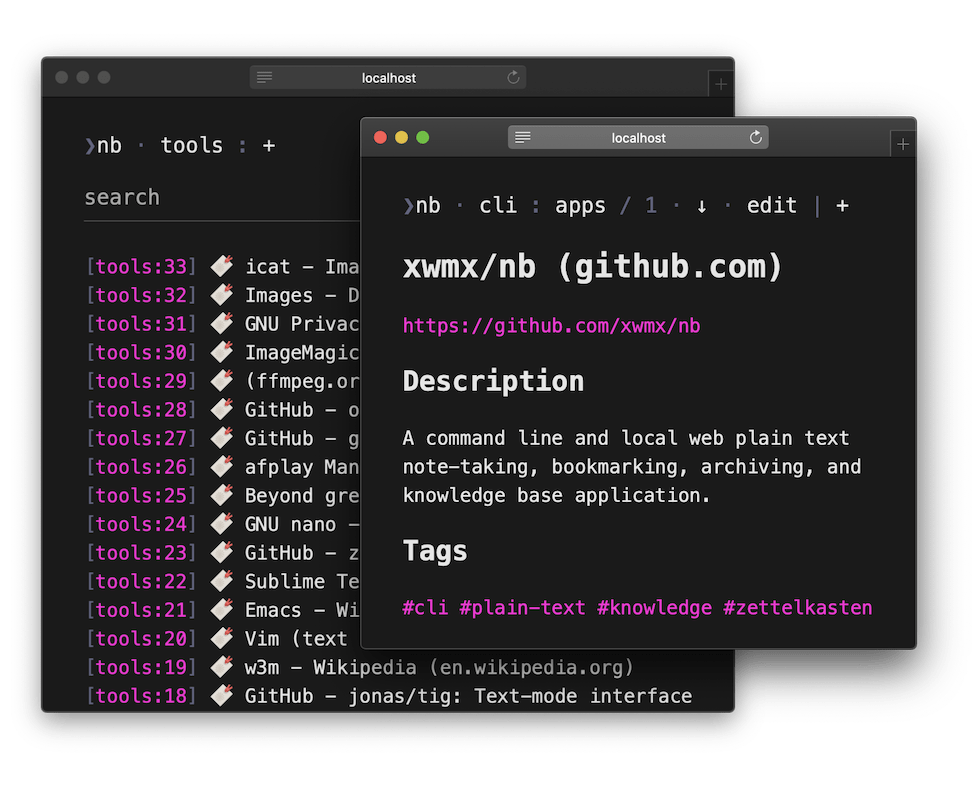
- Local web UI with nb browse
This bridges the CLI and a lightweight, local web experience. Fire up nb browse to navigate notebooks and folders, open notes, and traverse your knowledge via [[wiki‑style links]] and #tags—right in a terminal browser (w3m, Lynx, Links) or your regular GUI browser. You can even add and edit items from the browser. It feels delightfully “wiki,” yet it’s all local and text‑first. - Progressive enhancement, elegantly done
nb runs great with just Bash and Git. But if tools like pandoc, bat, ripgrep, w3m, and others are present, it automatically “levels up” with syntax highlighting, faster search, terminal‑friendly previews (including images), and more. No lockstep dependency list—just graceful upgrades when your environment supports them. - Composability, the Unix way
nb plays beautifully with other CLI tools. Pipe clipboard content straight into a new note or snippet:
pbpaste | nb add .js
Little touches like this make it trivial to weave nb into your existing workflows.
Who nb Is For
nb isn’t trying to be everything to everyone. It’s unapologetically tailored for a certain kind of user:
- Developers and ops folks who live in terminals
- Plain‑text and Markdown enthusiasts
- Privacy‑minded people who want true data ownership
- Zettelkasten practitioners who benefit from [[wiki‑style linking]], tags, and small, interconnected notes
Costs and One Small Caveat
- Learning curve, not license fees: nb is free and open source (AGPL‑3.0). The “cost” is familiarity with the command line. Git basics help—even though nb abstracts most of it for you.
- Windows note: You’ll want WSL, MSYS, or Cygwin for a comfortable Unix‑like environment.
- UX expectations: The local web UI (nb browse) prioritizes function over form. That’s by design. If you expect a glossy, consumer‑grade interface, this will feel intentionally austere. Personally, I’d love to see even more community plugins extend what’s already here.
Final Thoughts
nb doesn’t try to dazzle everyone. It has a strong point of view: keep the data human, local, and future‑proof; add power with Git; compose with the tools you already love. If you’re building a digital garden that should outlive services and trends—and you want complete control over your “second brain”—nb is absolutely worth your time.


 My Own Sys
Leave a comment